Count the things you’ve started and haven’t finished. The half-written email, the form you opened, the shelf you emptied but never put back. Say it’s fifteen, and in a normal week you finish about five things.
On average, each of those fifteen will take about three weeks to get done. That isn’t a productivity insult, just arithmetic. A queueing result called Little’s Law (Little, 1961) says the average number of items in a system equals how fast they come out multiplied by how long each one stays. Fifteen in progress divided by five a week is three weeks each. Cut what’s in progress to three, finish at the same pace, and the wait drops to under a week.
That’s the whole case for a personal kanban board. It shows what you’ve started, and it caps it. This guide covers what a personal kanban board is, how to set one up on paper or for free, why the WIP limit matters, examples, column ideas, a free printable board, and how it goes with ADHD.
What is a personal kanban board?
A personal kanban board is your to-do list turned into columns. Each task gets its own card or sticky note, and the card moves left to right as the task moves along: Ready, then Doing, then Done.
Jim Benson and Tonianne DeMaria Barry adapted it for one person in their 2011 book Personal Kanban. It has two rules:
- Visualize your work. Everything you’ve committed to goes on the board, so you can see it.
- Limit your work in progress. Only a few cards can sit in Doing at once. That cap is called a WIP limit.
The word comes from Toyota. A kanban was a card that said which parts were needed, how many, where and when. Toyota’s own history says the card system grew out of a “supermarket method,” proposed in 1954, where each step of the line took only what it needed from the step before, and that kanban was adopted at all its plants in 1963. The part that carries over to a desk or a fridge door is the pull: you start a new task only when there’s room for it.
How to set up a personal kanban board, step by step
You need about twenty minutes the first time.
1. Pick a surface you’ll see every day
A door, a wall by your desk, the fridge, or a single sheet of paper taped next to your screen. Small sticky notes (around 1.5 by 2 inches) fit a lot of cards in a small space. If you’d rather use an app, any free board app or a spreadsheet with three columns works. Choose the one you’ll look at without having to open something.
2. Brain dump everything into a backlog
Write every task you can think of on a separate list. Errands, work tasks, the thing you promised your sister. This list is the backlog, and it does not go on the board. Our brain dump guide has prompts for when your mind goes blank.
3. Draw three columns: Ready, Doing, Done
Copy five to eight tasks from the backlog onto cards and put them in Ready. These are the next things you’d pick. Leave Doing and Done empty for now.
Write each card so you can tell when it’s finished. “Book dentist” works. “Health stuff” doesn’t.
4. Set a WIP limit of three on Doing
Write “3” at the top of the Doing column, or draw three boxes. When three cards are in Doing, the column is full. To start something new, you finish one first, or move one back to Ready on purpose.
5. Pull one card at a time
Pick a card from Ready, move it to Doing, and work on it. When it’s done, move it to Done and pull the next one. If a new task shows up, it goes on the backlog or into Ready. It doesn’t jump straight into Doing.
6. Clear Done once a week
Leave finished cards in Done until the end of the week. Then count them, look at which card sat in Doing longest, and refill Ready from the backlog. That’s ten minutes, and it slots into a weekly review if you already do one.
What is a WIP limit, and why start with three?
WIP stands for work in progress. A WIP limit is the most cards you allow in Doing at once. It’s the rule people skip, and it’s the one doing most of the work.
The first reason is the arithmetic from the opening. Little’s Law applies to your tasks the same way it applies to a factory line: at the same finishing pace, fewer things in progress means each one finishes sooner.
The second is what switching does to you. In lab experiments by Rubinstein, Meyer and Evans (2001), every switch between tasks cost time, and the cost grew as the tasks got more complex. Sophie Leroy (2009) found that people who moved on from an unfinished task did worse on the next one, because part of their attention stayed behind. She called it attention residue. And in a study of interrupted office work, Gloria Mark and colleagues (2008) found that people made up for interruptions by working faster, but reported more stress, frustration, time pressure and effort. Five open tasks means a lot of switching.
Why three? Benson is open that it’s a starting guess. On the Personal Kanban site he calls three “a handy, arbitrary one” and warns against treating the number as a law. His example: if you’re at your limit and a real emergency comes up, deal with the emergency. Adjust from there:
- Doing is rarely full? Try two.
- You keep breaking the limit for good reasons? Try four.
- One card has sat in Doing for a week? It’s probably too big. Split it into smaller cards.
Change the number at your weekly check, not in the middle of a hard Tuesday.
Personal kanban board examples
Three boards, one row each. The cards are the kind of thing that really sits on a fridge or a desk wall.
| Board | Ready | Doing | Waiting on | Done |
|---|---|---|---|---|
| Student, exam season (limit 2) | practice paper 1 (questions 1 to 10), chapter 6 summary, email tutor | lab report method section, flashcards for chapter 5 | chapter 5 reading, booked study room | |
| Home and life admin (limit 3) | cancel the unused gym membership, order printer ink, fix the bathroom door handle | tax documents into one folder, call the insurance company | landlord about the dishwasher (asked Monday), refund for the shoe order | car registration, birthday gift posted |
| Work (limit 3) | draft Q1 budget, review Priya’s slides, update the onboarding doc | client proposal, bug ticket 412 | legal sign-off on the contract (asked Thursday) | weekly report, interview prep |
The student board runs a limit of two, because exam weeks come with surprise tasks. “Lab report” was too big for one card, so only the method section went in. The rest of the student’s list (chapters 7 to 9, practice paper 2, the bus pass) stays on the backlog until there’s room.
Life admin is where the Waiting on column earns its spot. “Call the insurance company” stays in Doing until you’ve actually called. Once you’re waiting on their reply, it moves to Waiting on with a date, and it stops eating a Doing slot.
On the work board, messages and meetings don’t get cards. They happen around the board, which is for the work that only moves if you push it.
Personal kanban board ideas (columns worth adding)
Three columns is enough for most people. If you add more, stay at five or fewer, or the board turns back into a long list with extra steps.
- Waiting on. For tasks blocked by someone else. Write who and the date you asked. This is the column most people end up adding.
- Today. A small column between Ready and Doing for the one to three cards you mean to touch today. It pairs well with a daily method like the 1-3-5 rule.
- Swimlanes. Horizontal rows for Work and Home, with one shared WIP limit across both. A separate limit for each row tends to double how much you start.
- Colors. One sticky note color for anything with a hard date. Keep it to one meaning per color, or you’ll stop noticing.
What to skip: a “Someday” column on the board (that’s the backlog’s job), and columns for every stage of a task, like Draft, Edit and Review, unless you really hand work between those stages.
A free personal kanban board printable (PDF and copyable)
We made a two-page printable: download the personal kanban board (PDF). It’s free, and there’s no email form.
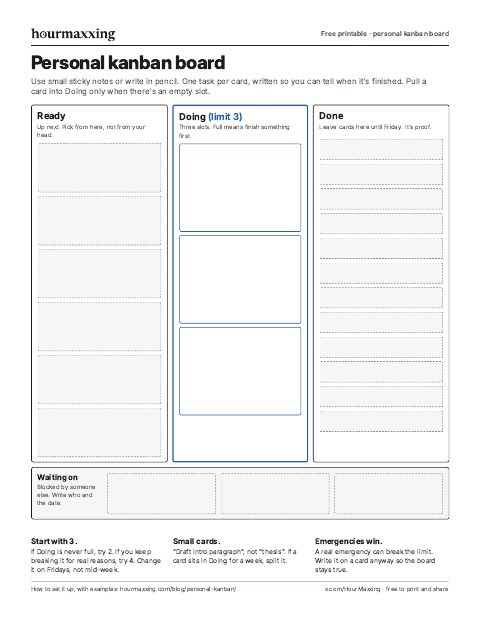
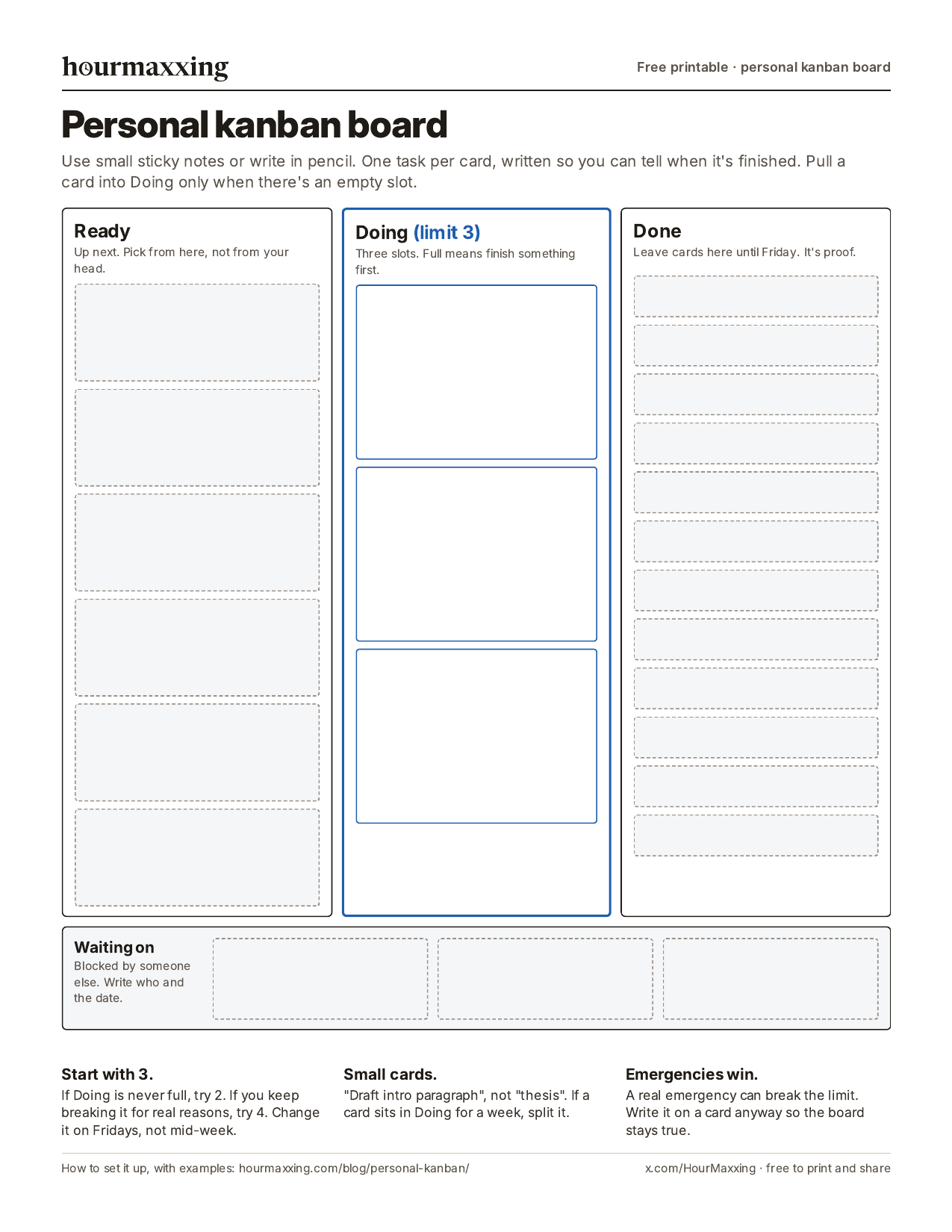
Page 1 is the board: Ready with six slots, Doing with three, Done, and a Waiting on strip. The slots fit small sticky notes, or you can write in pencil and erase. Page 2 is a backlog list and a ten-minute Friday check (cards finished, which card sat longest, what to chase, and whether to change the limit). There’s also a phone image of page 1.
If you’d rather keep it in a notes app, paste this in:
BACKLOG (not this week)
-

READY (5 to 8 cards)
-

DOING (limit 3)
1.
2.
3.

WAITING ON (who, date asked)
-

DONE (clear on Friday)
-
Personal kanban vs a to-do list (and other methods)
A to-do list shows what’s left. A kanban board also shows what you’ve started and haven’t finished. If your problem is a pile of half-done things, the board helps more than another list.
It also mixes well with other methods:
- Ivy Lee or 1-3-5 decide what goes in Ready for tomorrow. Kanban decides how many you have open at once.
- The Eisenhower matrix sorts the backlog. Anything urgent and important goes to the top of Ready.
- Time blocking gives the cards in Doing a slot on the calendar. A Pomodoro timer works for a single card when you can’t get started.
When it’s the wrong tool: if most of your day is fixed appointments, a calendar does more. And if you have three tasks total, you don’t need columns.
Personal kanban with ADHD
Out of sight, out of mind is a common ADHD complaint, and a board on the wall puts the work back in sight. Researchers call using the outside world to hold information “cognitive offloading” (Risko and Gilbert, 2016). A kanban board is offloading with a structure. The WIP limit also gives you a reason to say no to starting a sixth thing when a fresh idea shows up.
A few changes help:
- Paper over apps. You have to remember to open an app. You walk past a door.
- Start with a limit of two. You can raise it after a week if two feels too tight.
- Small cards only. If you can’t picture the first move, the card is too big. “Open the tax folder and find last year’s return” beats “Taxes.”
- Use a timer for the first card. A visual timer shows time passing, which helps when 20 minutes feels like 5.
You may have heard that unfinished tasks nag at you because of the Zeigarnik effect. The evidence is mixed. A 2025 meta-analysis by Ghibellini and Meier found no reliable memory advantage for unfinished tasks, though people did tend to go back and resume them. A separate set of experiments by Masicampo and Baumeister (2011) found that unfinished goals kept popping into people’s heads and hurt performance on an unrelated task, and that writing a specific plan for the goal made those effects go away. A card in Ready with a clear next step is that kind of plan.
This is a planning tool, not treatment. If starting or finishing tasks is a struggle most days, it’s worth raising with a doctor.
Common personal kanban mistakes
- No limit. Without a WIP limit, the board is a to-do list in a different shape. Write the number on the column.
- Ready gets as long as the backlog. Keep it to five to eight cards. Everything else stays on the backlog list.
- Cards that are projects. “Move house” will sit in Doing for a month. Split it.
- Stale cards in Doing. If a card hasn’t moved in a week, either break it down or move it back to Ready. Leaving it there lowers your limit without you noticing.
- Never clearing Done. Count the cards on Friday, then clear them. The count is how you learn what a real week holds.
- Rebuilding the board every week. Keep it plain for at least a month before you redesign it.
Sources
- Benson, J., & DeMaria Barry, T. (2011). Personal Kanban: Mapping Work, Navigating Life. Modus Cooperandi Press.
- Benson, J. How to: Setting your personal WIP limit. Personal Kanban. https://personalkanban.com/pk/uncategorized-how-to-setting-your-personal-wip-limit/ (accessed November 18, 2026).
- Toyota Motor Corporation. 75 years of Toyota: The origins of Just-in-Time; Supermarket method; Development and deployment of the Toyota Production System. https://www.toyota-global.com/company/history_of_toyota/75years/ (accessed November 18, 2026).
- Little, J. D. C. (1961). A proof for the queuing formula: L = λW. Operations Research, 9(3), 383-387. https://doi.org/10.1287/opre.9.3.383.
- Rubinstein, J. S., Meyer, D. E., & Evans, J. E. (2001). Executive control of cognitive processes in task switching. Journal of Experimental Psychology: Human Perception and Performance, 27(4), 763-797. https://doi.org/10.1037/0096-1523.27.4.763.
- Leroy, S. (2009). Why is it so hard to do my work? The challenge of attention residue when switching between work tasks. Organizational Behavior and Human Decision Processes, 109(2), 168-181. https://doi.org/10.1016/j.obhdp.2009.04.002.
- Mark, G., Gudith, D., & Klocke, U. (2008). The cost of interrupted work: More speed and stress. Proceedings of the SIGCHI Conference on Human Factors in Computing Systems, 107-110. https://doi.org/10.1145/1357054.1357072.
- Risko, E. F., & Gilbert, S. J. (2016). Cognitive offloading. Trends in Cognitive Sciences, 20(9), 676-688. https://doi.org/10.1016/j.tics.2016.07.002.
- Masicampo, E. J., & Baumeister, R. F. (2011). Consider it done! Plan making can eliminate the cognitive effects of unfulfilled goals. Journal of Personality and Social Psychology, 101(4), 667-683. https://doi.org/10.1037/a0024192.
- Ghibellini, R., & Meier, B. (2025). Interruption, recall and resumption: A meta-analysis of the Zeigarnik and Ovsiankina effects. Humanities and Social Sciences Communications, 12, 962. https://doi.org/10.1057/s41599-025-05000-w.
Want one more of these each week?
One technique a week, the study behind it, and a low-energy version. Free, about a 3-minute read, unsubscribe anytime.
We use your address only to send the email, and you can unsubscribe in one click.
FAQ
What is a personal kanban board?
A personal kanban board is a to-do list laid out as columns, usually Ready, Doing and Done, with one task per card. You move cards from left to right as you work, and you cap how many cards can sit in Doing at once. Jim Benson and Tonianne DeMaria Barry described it in their 2011 book Personal Kanban, with two rules: visualize your work and limit your work in progress.
What columns should a personal kanban board have?
Start with three: Ready (the few tasks up next), Doing (what you're working on now) and Done. Keep everything else in a separate backlog list so the board stays short. The most useful extra column is Waiting on, for tasks blocked by someone else. Try to stay at five columns or fewer.
What is a good WIP limit for personal kanban?
Three is the usual starting point for the Doing column. Jim Benson calls it a handy, arbitrary number, so treat it as a first guess. If Doing is rarely full, drop to two. If you keep breaking the limit for real reasons, try four, and only change it at your weekly check.
Is there a free personal kanban board?
Yes. A sheet of paper and a pack of small sticky notes work fine, and we made a free two-page printable board, no email needed: hourmaxxing.com/printables/personal-kanban-board.pdf. Page 1 has Ready, Doing with three slots, Done and a Waiting strip. Page 2 is a backlog list and a Friday check. A spreadsheet with three columns also works.
What's the difference between kanban and a to-do list?
A to-do list shows what's left. A kanban board also shows what you've started and haven't finished, and it caps that number. Most overwhelm comes from too many half-done things, and a plain list hides them.
Does personal kanban work for ADHD?
It suits a lot of ADHD readers because the work stays visible and the limit stops you starting a sixth thing. Keep the board on paper where you'll see it, set the limit to two at first, and make each card small. It's a planning tool, not treatment.
Should a personal kanban board be physical or an app?
Paper on a wall or door is easier to see without opening anything, which matters if out of sight means out of mind for you. An app is better if you work in several places or share tasks with someone. Pick the one you'll look at every day.
Where does kanban come from?
Toyota. Kanban means a card or signboard, and Toyota used kanban cards to say which parts, and how many, were needed where and when. The card system grew out of the 'supermarket method' proposed in 1954 and was adopted at all Toyota plants in 1963. Personal kanban borrows the idea of pulling new work only when there's room for it.
New here? Start with the reading order → Rather use paper? Grab a free printable.