It’s 4pm. You’ve answered 31 messages, joined two calls that could have been emails and fixed a spreadsheet someone needed “real quick”. The thing you actually had to do today, the one that matters for your grade or your job or your life, hasn’t been opened. Nothing you did was useless. It just all happened to be loud.
The Eisenhower matrix is a ten-minute fix for that kind of day. You sort everything by two questions, urgent and important, into four boxes, and each box tells you what to do. It’s simple enough that most guides stop at the grid. This one also covers why urgent-looking tasks keep beating important ones even when you know better, how to delegate when you have nobody to delegate to, and what the research says about whether any of this works.
There’s a free Eisenhower matrix template at the end, as a printable PDF and as text you can paste into your notes.
TL;DR: Write this week’s one to three priorities first. Then sort each task. Urgent means something real happens within a day or two if it slips. Important means it moves one of those priorities. Box 1 (both) gets done today, three things max. Box 2 (important, not urgent) gets a day and a time, because it’s the box that never gets urgent until it’s on fire. Box 3 (urgent, not important) gets handed off or shrunk. Box 4 gets dropped. Write what each task is worth next to it, because urgency is very good at hiding a small payoff.
What is the Eisenhower matrix?
The Eisenhower matrix (also called the Eisenhower box, the urgent-important matrix or the Covey time management matrix) is a two-by-two grid. One axis asks whether a task is urgent, and the other asks whether it’s important. Every task lands in one of four quadrants:
| Quadrant | What it is | What you do | Examples |
|---|---|---|---|
| 1. Urgent and important | A real deadline soon, and it matters | Do it today | Assignment due tomorrow, a client’s site is down, rent due Friday |
| 2. Important, not urgent | Matters, but no deadline yet | Schedule it with a day and time | Studying for an exam in three weeks, a checkup, exercise, the side project |
| 3. Urgent, not important | Loud, time-limited, low payoff | Delegate it or shrink it | Most pings, a “quick question”, some meetings, a sale ending tonight |
| 4. Neither | Low payoff, no deadline | Drop it | Reorganizing your apps, the fourth tab of reviews, the doomscroll |
The useful part is the gap between quadrants 2 and 3. Quadrant 1 takes care of itself, because deadlines make you act. Quadrant 4 is easy to recognise. The real trade-off most days is a quadrant 3 thing that’s shouting versus a quadrant 2 thing that’s silent, and without a rule the shouting one wins.
Where the Eisenhower matrix came from
The name comes from a speech. On August 19, 1954, President Dwight D. Eisenhower addressed the World Council of Churches at Northwestern University and quoted “a former college president”: “I have two kinds of problems, the urgent and the important. The urgent are not important, and the important are never urgent.” He called it “a dilemma of modern man”. He was talking about world peace, not his inbox, and he never drew a grid.
The grid came in 1989, when Stephen Covey put it in The 7 Habits of Highly Effective People as the time management matrix, with Quadrants I to IV. Covey’s argument was that effective people spend more of their time in Quadrant II (important, not urgent: planning, prevention, relationships, health), because doing that work early shrinks the crises that fill Quadrant I. The “Eisenhower matrix” name and the do, schedule, delegate, delete labels came later from productivity writers and apps.
Why urgent tasks keep winning (the mere urgency effect)
If the logic is that obvious, why do so many days end with the important thing untouched? Part of the answer has been tested in the lab.
In five experiments, Meng Zhu, Yang Yang and Christopher Hsee (2018) gave people a choice between two equally easy tasks, one with a bigger payoff and one with a smaller payoff that “expired” sooner. The expiry was fake: everyone had plenty of time to finish either task.
In the first study, 13.3% of students picked the worse-paying task when both expired in 24 hours. When the worse one expired in 10 minutes instead, 31.3% picked it, and gave up chocolate for nothing. Online workers did the same with real bonus money. The researchers called it the mere urgency effect: a task that looks urgent gets picked partly because it looks urgent, whatever it’s worth.
Two follow-up findings are the most useful part. People who described themselves as busy showed a stronger effect. And when the researchers simply reminded people of each task’s payoff right before they chose, the effect shrank until it was no longer reliable. That’s why the template has a “what it’s worth” column. Writing the payoff next to the task does the reminding for you, at the moment you choose.
Real life adds more fake deadlines than any lab: red badges, “just checking in” follow-ups, countdown timers in shopping apps, a coworker’s emergency that turns out to be a preference. If your phone generates most of your urgency, our guide to making your phone boring cuts the supply.
How to use the Eisenhower matrix (step by step, 10 minutes)
This is the version we’d actually run. Set a 10-minute timer, because sorting tasks is planning, and planning is a very comfortable place to hide from doing.
1. Write this week’s one to three priorities
“Important” only means something relative to a goal. Before sorting anything, write the one to three things that matter most this week: pass the stats midterm, ship the onboarding redesign, get the apartment deposit back. Without this line, everything feels important and the matrix fills box 1 with all of it.
2. Dump every task onto one list
Get it all out of your head first, including the small stuff and the stuff you’re avoiding. If the list runs past 30 or 40 items, do a quick brain dump and triage first, because sorting 47 items one at a time is its own afternoon.
3. Ask the two questions, strictly
For each task, ask:
- Is it urgent? Something real happens within a day or two if it slips: a late fee, a missed deadline, a person blocked and waiting on you. Feeling rushed doesn’t count, and neither does a notification badge.
- Is it important? It moves one of your priorities, or skipping it for a month would cost you real money, health, grades, your job or a relationship.
Be strict on urgent. Most of the mistakes people make with the matrix come from treating “someone wants this soon” as “this is urgent”.
4. Write down what each task is worth
One line: “worth a third of my grade”, “keeps the client”, “nothing, really”, “saves me 20 minutes every week”. This is the step most guides skip, and it’s the one with the most direct lab evidence behind it (the payoff reminder in Zhu and colleagues’ experiment). It also makes box 4 obvious.
5. Sort into the boxes, with box 1 capped at three
Put each task in its box. If box 1 holds more than three things, some of them aren’t really urgent, or the week is overbooked, and you need to cut or move something. If you don’t know where the hours are going, a few days of a time audit will show you. When everything truly is urgent, use a fixed order instead of comparing: real deadline in the next 24 hours first, then anything someone else is waiting on, then the task with the smallest first step. (That order comes from our decision fatigue guide.)
6. Give every box 2 task a day and a time
This is the step that makes the matrix worth doing. A box 2 task without a time slot sits there until it turns into a box 1 emergency: the exam you meant to study for becomes tonight’s all-nighter. Put each one on the calendar now, as a specific block (“Tuesday 9 to 10:30, stats problem set 3”). Leave slack, because your time estimates will run long, the same as everyone’s (that’s the planning fallacy). Our time blocking guide covers how to protect that first block. For a paper or project with a due date, the assignment calculator splits it into steps with their own dates, ready to drop onto the calendar.
Scheduling also clears your head. In studies by E. J. Masicampo and Roy Baumeister (2011), unfinished goals kept intruding on people’s thoughts during unrelated tasks, and making a specific plan for when and how to do them made those intrusions go away. The plan has to be real, though: the people whose intrusions stopped were the ones who later carried their plans out.
7. Start the first thing in box 1
Then close the matrix. If you look at that first task and can’t make yourself begin, that’s a different problem with its own fix: try the 5-minute unstick script.
Eisenhower matrix examples
Here’s a realistic week for three different people, sorted. The same kind of task can land in different boxes: a meeting is box 1 for one person and box 3 for another.
A student during midterms
- Do: the lab report due at 9am tomorrow, and the email to the TA about a missing grade before the regrade window closes on Friday.
- Schedule: starting on the stats final that’s three weeks out, office hours about the thesis topic, and sleep.
- Delegate or shrink: the group chat planning the party, and a club survey that’s “due tonight”.
- Drop: recolouring notes you already made, and another video about how to study.
An office job
- Do: the bug blocking checkout, and tomorrow’s client presentation.
- Schedule: the onboarding doc that would stop the same five questions every week, and a one-on-one with your manager about the promotion.
- Delegate or shrink: most Slack pings, a meeting where you’re optional, and a “quick” formatting request.
- Drop: reorganizing the folders on your drive, and reading every all-company thread.
Home and life admin
- Do: the electric bill due tomorrow, and the prescription that runs out on Thursday.
- Schedule: booking the dentist, setting up automatic savings, and the walk with a friend you keep cancelling.
- Delegate or shrink: a flash sale ending tonight, and calling back a sales rep.
- Drop: redoing your phone’s home screen, and comparing six reviews of a vacuum when yours works fine.
A free Eisenhower matrix template (PDF and copyable)
We made a two-page printable: download the Eisenhower matrix template (PDF). It’s free, and there’s no email form.
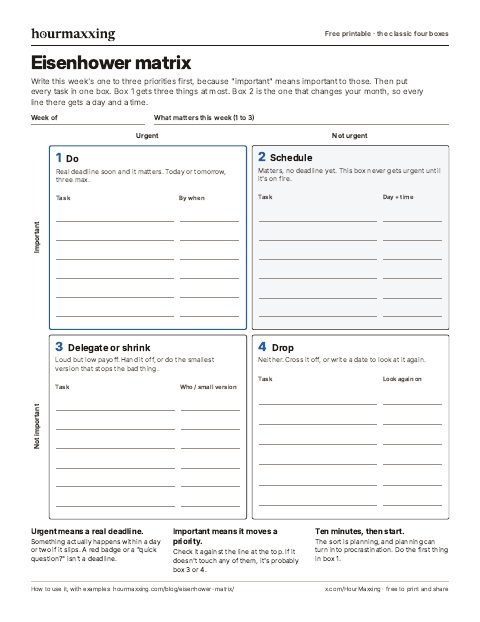
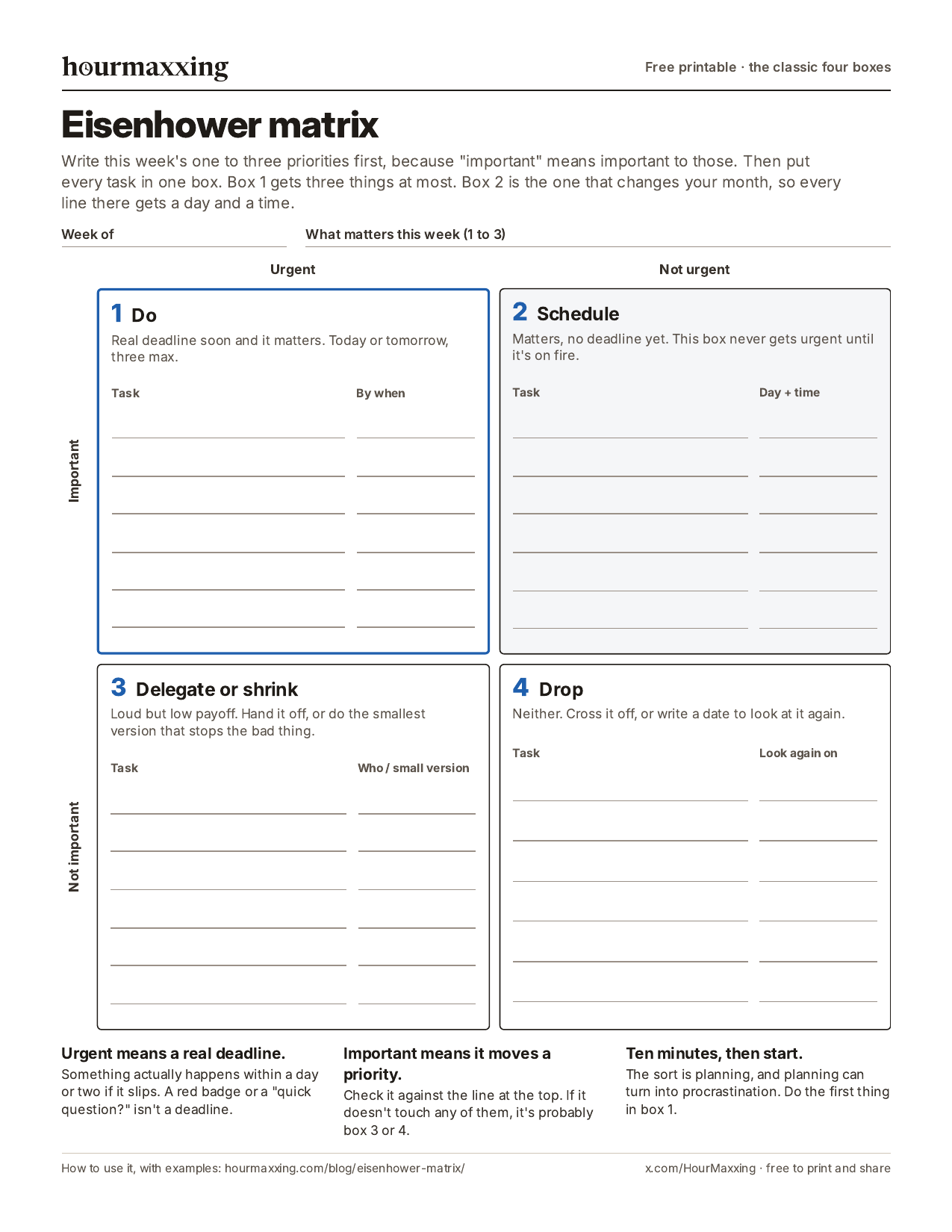
Page 1 is the grid. It starts with a line for this week’s one to three priorities, so you have something to measure “important” against. Box 1 has a by-when column and is capped at three. Box 2 has a day-and-time column, because that’s the whole point of box 2. Once a box 2 task has its day, copy it onto a printable weekly planner so it sits next to everything else that week. Box 3 has a column for who it goes to or what the small version is, and box 4 has a date to look at it again.
Page 2 is the sorting sheet and a Friday check. For long lists, each task gets what it’s worth, what happens if it waits a week, and urgent and important ticks, before it goes into a box. The Friday check asks whether each box 2 slot actually happened. A slot that didn’t happen gets moved to a new day, not deleted. Bringing it back every week is how box 2 work gets done.
There’s also a phone image of page 1 to mark up in your photos app. For Excel or Google Sheets, there’s a spreadsheet version (CSV) with one row per task, a column for each yes-or-no question, and four filled-in example rows to delete. In Sheets, use File, then Import. If you’d rather type into a note (Notes, Notion or Google Docs), put these headings at the top:
- This week’s priorities (1 to 3): the things “important” gets measured against.
- 1. Do (urgent and important, three max): each task plus when it’s due.
- 2. Schedule (important, not urgent): each task plus the day and time you’ll do it.
- 3. Delegate or shrink: each task plus who it goes to, or the smallest version that stops the problem.
- 4. Drop: each task plus a date to look at it again, or nothing at all.
- Friday: did every box 2 slot happen? Move the ones that didn’t to a new day.
How to delegate when there’s nobody to delegate to
Most people using the Eisenhower matrix don’t manage a team, so “delegate” reads like a joke. Read quadrant 3 as “make it cost less of your best time” instead. You have more options than handing it to an assistant:
- Do the smallest version that stops the bad thing. A two-line reply instead of a perfect one. “Got it, I’ll look Thursday” counts as a full answer to a lot of messages.
- Batch it. Answer the non-urgent messages in one 20-minute slot after lunch, not as they arrive.
- Automate it. Autopay, a filter, a saved reply, a recurring order.
- Hand it back. If something is urgent only because someone else planned late, it’s fine to say when you can actually do it.
- Say no. Some quadrant 3 tasks are someone else’s quadrant 4.
Does the Eisenhower matrix actually work?
We couldn’t find a controlled trial of the Eisenhower matrix itself. What does exist is evidence for the pieces it’s built from.
The urgency trap is real and measurable, as above, and the specific fix the template uses (writing the payoff down at the moment you choose) weakened it in the lab. Making specific plans for unfinished goals reduces how much they nag at you, which is what box 2 scheduling does. And if-then plans with a specific time and place are among the best-tested tools in this area: a meta-analysis by Peter Gollwitzer and Paschal Sheeran (2006) pooled 94 tests and found a medium-to-large effect on reaching goals (d = 0.65).
For time management as a whole, the best summary is a 2021 meta-analysis by Brad Aeon, Aïda Faber and Alexandra Panaccio: 158 studies and 53,957 participants. Time management was moderately related to job performance (correlations around r = .25), academic achievement and wellbeing, and it was more strongly linked to life satisfaction than to performance.
An earlier review of 32 studies by Brigitte Claessens and colleagues (2007) found time management behaviours went with feeling more in control of your time, job satisfaction, health and lower stress, while the link to performance was unclear. Most of these studies are correlational, so read them as “people who manage time this way tend to do better”, not proof that a grid will raise your grades.
Our take is that most of the matrix’s value comes from two habits it forces on you, checking what a task is really worth before you do it, and putting important work on the calendar before it turns urgent.
Common Eisenhower matrix mistakes
- Everything ends up in box 1. Urgent got defined as “someone wants it” or “I feel stressed”. Use the strict test: what actually happens if this waits two days?
- Box 2 without a time slot. The list of important things just sits there, which is the exact problem the matrix exists to solve.
- Spending 40 minutes making it beautiful. Colour-coded quadrants in a fancy app, then answering emails anyway. Ten minutes, then start.
- Sorting a 60-item list. That’s a triage job first. Get it down to today’s three and a backlog.
- Treating other people’s urgency as yours. Their late planning goes in box 3 for you, even when it’s box 1 for them.
- Never looking at it again. Once a week, check what happened to box 2 (our weekly review checklist builds that check in). The same task showing up in box 1 week after week was a box 2 task nobody scheduled. A recurring slot fixes that, and so does turning it into a habit with a fixed cue.
Eisenhower matrix vs other methods
- Vs a to-do list. The matrix decides what goes on the list and what doesn’t. Use it weekly, then keep a short daily list of what’s in box 1 plus today’s box 2 slot.
- Vs time blocking. They work together. The matrix tells you what deserves a block, and time blocking gives it one.
- Vs eat the frog. Eating the frog means doing your hardest important task first thing. That’s usually a box 1 or box 2 task, so the matrix picks the frog.
- Vs the two-minute rule. David Allen’s rule (if it takes under two minutes, do it now) is a fast lane for tiny box 3 tasks, so they never need sorting. More on that in the two-minute triage guide.
- Vs the Ivy Lee method. The Ivy Lee method is a daily list: tomorrow’s six most important tasks, ranked, worked one at a time. Sort the week with the matrix, then pull each evening’s six mostly from boxes 1 and 2.
- Vs the 1-3-5 rule. The 1-3-5 rule is a daily list sorted by size: one big task, three medium, five small. Pull the big one from box 1 or 2.
- Vs the MIT method. The MIT method picks one to three most important tasks each morning and does them first. Pull them from box 1 or 2.
- Vs the ABCDE method. The ABCDE method letters a daily list by one question, what happens if this doesn’t get done, then numbers the As. It has no urgent axis, so it’s quicker for a daily list. Sort the week here, letter each day there.
- Vs the Pomodoro technique. Different jobs. The matrix chooses the task, and a Pomodoro timer helps you stay on it.
Using the Eisenhower matrix with ADHD
The grid asks you to judge the importance of every single task, and for a lot of ADHD brains that judging is exactly where things freeze. If you find yourself 30 minutes into rating tasks, switch to two yes-or-no questions: does something bad happen if this waits a day, and will this matter in a month? Our ADHD Eisenhower matrix section explains how the answers map to the boxes, and there’s a separate free ADHD Eisenhower matrix printable built around them.
Sources
- Eisenhower, D. D. (1954, August 19). Address at the Second Assembly of the World Council of Churches, Evanston, Illinois. The American Presidency Project, UC Santa Barbara. https://www.presidency.ucsb.edu/documents/address-the-second-assembly-the-world-council-churches-evanston-illinois. Full text read: the “two kinds of problems” line, attributed to “a former college president”.
- Covey, S. R. (1989). The 7 Habits of Highly Effective People. Free Press. Habit 3, “Put First Things First”: the time management matrix, Quadrants I to IV.
- Zhu, M., Yang, Y., & Hsee, C. K. (2018). The mere urgency effect. Journal of Consumer Research, 45(3), 673-690. https://doi.org/10.1093/jcr/ucy008. Full text read: five experiments; experiment 1, 13.3% vs 31.3% chose the low-payoff task; experiment 3, a payoff reminder attenuated the effect (33.7% vs 20.6% in the urgency condition); experiment 4, stronger among people who feel busy.
- Masicampo, E. J., & Baumeister, R. F. (2011). Consider it done! Plan making can eliminate the cognitive effects of unfulfilled goals. Journal of Personality and Social Psychology, 101(4), 667-683. https://doi.org/10.1037/a0024192.
- Gollwitzer, P. M., & Sheeran, P. (2006). Implementation intentions and goal achievement: A meta-analysis of effects and processes. Advances in Experimental Social Psychology, 38, 69-119. https://doi.org/10.1016/S0065-2601(06)38002-1. 94 independent tests, d = 0.65.
- Aeon, B., Faber, A., & Panaccio, A. (2021). Does time management work? A meta-analysis. PLOS ONE, 16(1), e0245066. https://doi.org/10.1371/journal.pone.0245066. Full text read: 158 studies, 53,957 participants; job performance r around .25; stronger links with wellbeing.
- Claessens, B. J. C., van Eerde, W., Rutte, C. G., & Roe, R. A. (2007). A review of the time management literature. Personnel Review, 36(2), 255-276. https://doi.org/10.1108/00483480710726136. 32 empirical studies, 1982 to 2004.
- Buehler, R., Griffin, D., & Ross, M. (1994). Exploring the “planning fallacy”: Why people underestimate their task completion times. Journal of Personality and Social Psychology, 67(3), 366-381. https://doi.org/10.1037/0022-3514.67.3.366.
Want one more of these each week?
One technique a week, the study behind it, and a low-energy version. Free, about a 3-minute read, unsubscribe anytime.
We use your address only to send the email, and you can unsubscribe in one click.
FAQ
What is the Eisenhower matrix?
The Eisenhower matrix is a four-box grid for sorting tasks by two questions: is it urgent, and is it important? Urgent and important tasks get done now, important but not urgent tasks get scheduled, urgent but unimportant tasks get delegated or shrunk, and tasks that are neither get dropped. It's named after Dwight D. Eisenhower, who quoted the urgent-versus-important line in a 1954 speech, and Stephen Covey's 1989 book The 7 Habits of Highly Effective People made the grid famous.
What are the 4 quadrants of the Eisenhower matrix?
Quadrant 1 is urgent and important: do it today. Quadrant 2 is important but not urgent: schedule it with a day and a time. Quadrant 3 is urgent but not important: delegate it, batch it, or do the smallest version that stops the problem. Quadrant 4 is neither urgent nor important: drop it. The popular short labels are do, schedule, delegate and delete.
How do you use the Eisenhower matrix?
Write this week's one to three priorities at the top. List every task. For each one, ask whether something real happens within a day or two if it slips (urgent) and whether it moves one of your priorities or would cost you something real if skipped for a month (important). Write what each task is worth, put it in its box, cap box 1 at three items, give every box 2 task a day and a time, and start the first thing in box 1. The whole sort should take about 10 minutes.
Is there a free Eisenhower matrix template?
Yes. We made a free two-page Eisenhower matrix template PDF, no email needed: hourmaxxing.com/printables/eisenhower-matrix.pdf. Page 1 is the four-box grid with a line for this week's priorities, a by-when column for box 1 and a day-and-time column for box 2. Page 2 is a sorting sheet (task, what it's worth, what happens if it waits a week, urgent and important ticks) plus a Friday check for whether the box 2 slots happened. There's also a CSV version for Excel or Google Sheets (hourmaxxing.com/printables/eisenhower-matrix.csv) and a copyable text version on this page for Notes, Notion or Google Docs.
What goes in quadrant 2 of the Eisenhower matrix?
Quadrant 2 holds important tasks without a deadline yet: studying for an exam that's three weeks away, a doctor's checkup, a side project, exercise, updating your CV, fixing the thing at work that causes the same fire every month, calling a friend. Covey argued this is the quadrant that matters most, because these tasks never get urgent until they become emergencies. Give each one a specific day and time, or it will sit there.
Does the Eisenhower matrix actually work?
Nobody has run a controlled trial of the matrix itself, as far as we could find. The research around it is encouraging, though. In five experiments, Zhu, Yang and Hsee (2018) showed that people pick urgent-looking, lower-payoff tasks over better ones, and that reminding them of each task's payoff right before choosing weakened the effect. And a 2021 meta-analysis of 158 studies found that time management in general is moderately linked to better job performance, grades and especially wellbeing.
What is the difference between the Eisenhower matrix and the Covey time management matrix?
They're the same four-box grid. Eisenhower supplied the quote in 1954 (he was quoting an unnamed former college president), and Covey drew it as a time management matrix with Quadrants I to IV in 1989. The 'Eisenhower matrix' name and the do, schedule, delegate, delete labels came later, from productivity writers and apps.
How do you delegate if you have no one to delegate to?
Most people using the matrix aren't managers, so read quadrant 3 as 'make it cost less'. Do the smallest version that stops the bad thing (a two-line reply instead of a perfect one), batch it into one daily slot, automate it, say no, or hand it back to the person whose urgency it really is. Quadrant 3 is about spending less of your best time on it.
Can I use the Eisenhower matrix with ADHD?
Yes, but rating the importance of every task can turn into the same comparing that freezes you. If that happens, use our two-question ADHD version instead: is it bad if this waits a day, and will it matter in a month? There's a separate free ADHD Eisenhower matrix printable built around those two questions.
New here? Start with the reading order → Rather use paper? Grab a free printable.