Short answer: an ideal week is a default weekly template, not a daily plan. You draw, once, where focus work, meetings, admin and rest usually go, and leave about 30% blank. Real weeks get copied from that template and adjusted. That is different from time blocking, which is how you plan one day, and from a weekly review, which is the 30-minute check-in. There’s a free ideal week template (PDF and spreadsheet) further down.
Most weeks get planned by whoever asks first. A meeting lands on Wednesday morning because Wednesday morning looked empty, and the report you meant to write slides to Thursday, then Friday, then a guilty Sunday afternoon.
An ideal week template gets there first. You decide, once, where your hardest work goes, when meetings are allowed, when email gets done and when you’re off, and you draw it on one page. Real weeks won’t match it exactly. When one falls apart, you have a default to rebuild from. Below are the seven steps, an example week, versions for students, parents and freelancers, a free ideal week template and what the research says.
What is an ideal week?
An ideal week is a one-page grid of the week you’d run if you controlled 100% of your calendar. Days go across the top, hours go down the side, and each block is labeled with what it’s for: focus work, meetings, admin, family, rest.
It’s a template. You don’t follow it hour by hour, and you won’t hit it most weeks. You use it three ways:
- To plan real weeks. Each weekend, copy the ideal week forward and adjust it for what’s actually happening.
- To say yes or no. When someone asks for Wednesday morning and Wednesday morning is your writing block, you offer Thursday afternoon instead.
- To recover. After a sick week or a trip, you go back to the default and don’t have to replan from scratch.
Where the ideal week comes from
The term was made popular by Michael Hyatt, who wrote about his “Ideal Week” in 2011. He described it as “the week I would live if I could control 100% of what happens,” laid out on a simple grid. Each day had a theme: Monday for his team, Tuesday and Wednesday for travel and long meetings, Thursday for outside requests, Friday for planning, Saturday for chores and Sunday for rest. He shaded blocks green if they served his goals, red if they didn’t, and left gray blocks unscheduled as margin.
Hyatt credits the idea to Todd Duncan’s book Time Traps (2004), written for salespeople. He compared it to a financial budget: you spend your time on paper first. More recently Dan Martell sells the same idea as the “Perfect Week” in Buy Back Your Time (2023), with deep work, meetings, admin and protected personal time each in their own color.
A related idea comes from Paul Graham’s 2009 essay “Maker’s Schedule, Manager’s Schedule”. Graham argued that people who make things need time in units of half a day, and that “a single meeting can blow a whole afternoon, by breaking it into two pieces each too small to do anything hard in.” That’s the reason most ideal weeks batch meetings together.
How to make an ideal week template, step by step
Use pencil, or a spare calendar you don’t mind wrecking. The order of the steps matters: the things you’d fit in last are the first to disappear, so they go in early.
1. Start with what’s fixed
Write in everything that happens every week no matter what: work or class hours, commute, the school run, a standing team meeting, Thursday football. Be honest about travel time. If the commute is 30 minutes door to door, block 40.
2. Put in sleep and meals
Pick a bedtime and a wake time and draw them on the grid before any work goes in. Then lunch and dinner. This feels too obvious to bother with, and it’s the step that stops the plan from assuming you’ll work until 1am.
3. Place your focus blocks in your best hours
Focus blocks are where your hardest work goes: writing, coding, studying, designing, the report. Most people can manage two to five blocks of 60 to 120 minutes a week, sometimes more. Put them in the hours when you think best, which for a lot of people is the first part of the morning. If you don’t know your best hours, a week of logging with a time audit will show you.
These are the blocks you protect first. Everything else bends around them.
4. Batch meetings and people time
If you have any say over your calendar, cluster meetings, calls and one-to-ones onto as few days or half days as you can. Martell stacks his on Tuesday and Thursday. Graham held his office hours at the end of the day so they never split his working time. If you don’t control your meetings, mark the times they usually land and put your focus blocks somewhere else.
5. Give admin a fixed home
Email, messages, forms, bills, expenses. Give them one or two fixed slots a day, often late morning and late afternoon. Admin left without a slot leaks into every gap, including the focus blocks.
6. Schedule rest and fun on purpose
Exercise, friends, a date night, an evening with nothing planned. If it matters to you, it gets a block. An ideal week that’s all work is a plan to be tired by Wednesday.
7. Leave buffer, and write your guardrails
Leave about 30% of your working hours blank. That’s our rule of thumb from the time blocking guide, not a study result, but it’s sized for the planning fallacy: things take longer than you think, and the buffer is where the overrun lands.
Then write two or three guardrails, short rules that protect the grid. Examples: no meetings before 10am; admin only in the admin blocks; Friday after 3pm is for the weekly review and nothing new. Martell’s are no meetings before 10am, a 20-minute default meeting length and no same-day meeting requests.
An ideal week example
Here’s a full-time office job with a hybrid schedule (office Tuesday and Thursday). The person thinks best in the morning and has no meetings they can’t move except a Monday team call.
- Monday (home): walk at 7:30, focus 9 to 11, admin until noon, team call at 1 then buffer, admin and buffer 3 to 5. Cook, free evening.
- Tuesday (office): commute, meetings and one-to-ones 9 to 3, admin 3 to 5. Gym after work.
- Wednesday (home): gym at 7, focus 9 to 11, admin until noon, a second focus block 1 to 3, buffer 3 to 5. Free evening.
- Thursday (office): commute, meetings 9 to 3, admin 3 to 5. Football.
- Friday (home): focus 9 to 11, admin until noon, buffer 1 to 3, then the weekly review and a shutdown at 3. Out.
- Saturday: sleep in, errands in the morning, friends in the afternoon. Out.
- Sunday: free all day, 20 minutes to plan the week in the late afternoon, early night.
Look at what’s missing: no focus block on office days, no work after 5pm, and two hours of buffer on Friday. The ideal week is allowed to look a bit empty. Real weeks will fill it.
Ideal week examples for students, parents and freelancers
Students. Class times are the fixed things. Put study blocks right after class while the material is fresh, or in your best free mornings, and give each one a subject so you don’t spend the first 20 minutes picking. Keep one weekday evening and most of one weekend day off. Our guide on how to focus on studying covers what to do inside those blocks.
Parents. The school run and bedtime are the fixed things, and there are fewer free hours than in any template online. Start with the one or two hours a day that are reliably yours, usually early morning or after bedtime, and give each a single job. Batch the logistics (forms, shopping lists, sports sign-ups) into one weekly admin block.
Freelancers and the self-employed. You have the most control and the least structure. Theme the days, for example Monday and Wednesday for client work, Tuesday for calls, Friday for invoicing and marketing, and set working hours with a real end time. A shutdown ritual at the end of each day gives that end time something to stand on.
Shift workers. Plan in parts of the day around the shift: a short focus block on your first free morning, admin straight after a shift, sleep protected before the first night. Fix only what you control and redraw the grid each time the rota changes.
A free ideal week template (PDF, spreadsheet and copyable)
We made a two-page printable: download the ideal week template (PDF). It’s free, and there’s no email form.
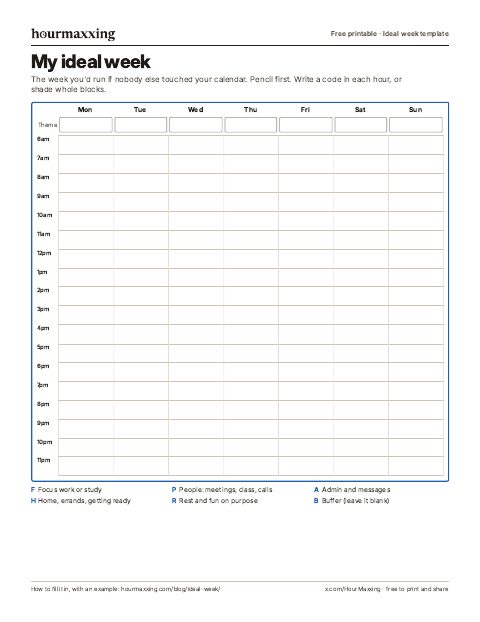
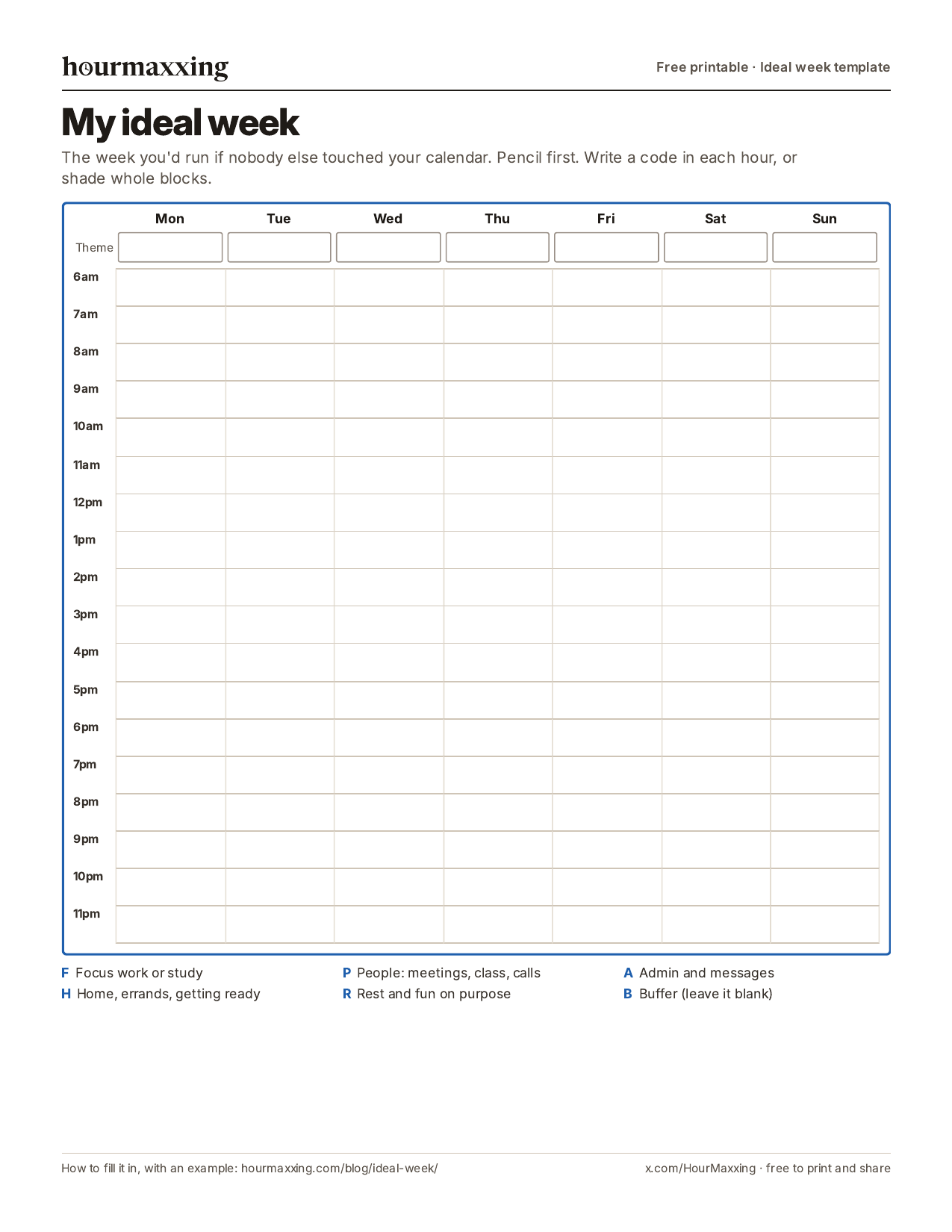
Page 1 is the week. Seven columns, Monday to Sunday, with hourly rows from 6am to midnight and a theme box at the top of each day. Write a code in each hour or shade whole blocks: F for focus, P for people, A for admin, H for home and errands, R for rest and B for buffer.
Page 2 is the build sheet. The seven steps in order with a tick box each, space for your guardrails, a table for planned and real hours per block type, and a two-week check: which block held, which broke and what broke it, and one change.
There’s also a phone image of page 1. For Excel or Google Sheets, there’s a spreadsheet version (CSV): the same grid with one letter per hour, plus a table that counts the hours for each block type and the blank hours for you. In Google Sheets use File, then Import. If you’d rather keep it in a note, copy this:
- Fixed: work or class hours, commute, school run, standing meetings.
- Sleep and meals: bedtime, wake time, lunch, dinner.
- Focus: 2 to 5 blocks of 60 to 120 minutes, in your best hours.
- People: meetings and calls, batched.
- Admin: 1 or 2 slots a day.
- Rest and fun: exercise, friends, one free evening.
- Buffer: about 30% of working hours, blank.
- Guardrails: 2 or 3 rules that protect the focus blocks.
How to use your ideal week
Once it’s drawn, put it somewhere you’ll see it when you plan. Some people copy it into their calendar as repeating events. Others keep it on paper next to the desk and copy it forward by hand each week. Both work. Repeating events are easier to keep and also easier to ignore, so try paper for the first two weeks.
Each week, at your weekly review, start from the ideal week and adjust: move the focus block that clashes with a dentist appointment, cross out the free evening that became a birthday dinner, add the deadline. Then pick each day’s tasks with whatever method you already use, such as the Ivy Lee method for a ranked list of six.
After two weeks, check it. Which blocks happened most days? Which kept breaking, and what broke them? Change one thing on the grid and run it again. Redraw the whole thing when the fixed things change: a new job, a new term, a new baby.
Does planning an ideal week work?
No one has tested the ideal week as a method, as far as we could find. What exists is research on its parts.
Time management in general helps a bit. A meta-analysis of 158 studies found that people who manage their time well do somewhat better at work (a correlation around .25) and report noticeably better wellbeing (Aeon, Faber and Panaccio, 2021). Most of those studies were one-time surveys, so they show a link and not that planning causes the benefits.
Deciding when and where you’ll do something makes it more likely to happen. Peter Gollwitzer and Paschal Sheeran (2006) pooled 94 tests of plans that say when, where and how you’ll act, and found a medium-to-large effect on reaching goals (Gollwitzer and Sheeran, 2006). A focus block on Wednesday at 9am is that kind of plan. “Work on the report this week” isn’t.
Same time, same place builds habits. In a study of 96 volunteers who picked a new daily behavior and did it in the same situation each day, it took a median of 66 days for the behavior to become as automatic as it got, with a range of 18 to 254 days (Lally and colleagues, 2010). An ideal week gives recurring blocks the same slot every week, which is the stable context that study relied on. That’s our inference, since the study tested daily habits, not weekly calendars.
Plans run long, so buffer is required. In a 1994 study by Roger Buehler, Dale Griffin and Michael Ross, 37 students predicted they’d finish their honors thesis in 33.9 days on average. They took 55.5 days, and fewer than a third finished by their own estimate. Even their “if everything goes as poorly as it possibly could” estimate, 48.6 days, was too short (Buehler, Griffin and Ross, 1994). An ideal week with no blank space assumes the opposite.
What we can’t tell you is whether color-coding, day themes or a specific number of focus blocks make any difference. Those are preferences from Hyatt, Martell and others, and they’re cheap to try.
An ideal week with ADHD
The template works for ADHD brains too, with a few changes:
- Make the grid visible. Put it on the wall by your desk or as your phone’s lock screen. A plan you have to remember to open doesn’t run.
- Fewer, shorter focus blocks. Two 60-minute blocks you actually start beat four 2-hour blocks you dread. You can lengthen them later.
- Put alarms on transitions. The start of a focus block and the end of the workday are where time slips. A recurring alarm with a label (“9am: open the report”) does the remembering.
- Expect more buffer. If time estimates often run long for you, try 40% blank. Our time blindness guide explains the personal multiplier, and the free time blindness test helps you find yours.
- Keep one anchor on days off. A completely blank Saturday often disappears. One block with a time, like “11am: groceries”, is enough.
This is about planning, not treatment. If planning problems are making work or life hard most weeks, that’s worth talking to a doctor about.
Common ideal week mistakes
- Planning every hour. A grid with no blank space breaks on Monday morning and then gets abandoned.
- Building the week of a different person. If you’ve never been a 5am person, don’t put your focus block at 5am. Start from the week you have and nudge it.
- Forgetting the boring time. Getting ready, travel, cooking, laundry. Leave them out and every block after them runs late.
- Treating misses as failure. Hyatt’s own advice was not to be legalistic about it. Most weeks will match part of the grid. That’s the point of having one.
- Never revisiting it. A grid from last semester will fight this one. Redraw it when the fixed things change.
Sources
- Hyatt, M. (2011, April 6). How to better control your time by designing your ideal week. Full Focus (fullfocus.co). https://fullfocus.co/ideal-week/.
- Duncan, T. (2004). Time Traps: Proven Strategies for Swamped Salespeople. Thomas Nelson.
- Martell, D. (2023). Buy Back Your Time: Get Unstuck, Reclaim Your Freedom, and Build Your Empire. Portfolio (Penguin). Also: Martell, D. (2026, April 6). The Perfect Week: How to protect your time, stack your wins, and finally get ahead. https://www.danmartell.com/the-perfect-week-how-to-protect-your-time-stack-your-wins-and-finally-get-ahead/.
- Graham, P. (2009, July). Maker’s schedule, manager’s schedule. https://paulgraham.com/makersschedule.html.
- Aeon, B., Faber, A., & Panaccio, A. (2021). Does time management work? A meta-analysis. PLOS ONE, 16(1), e0245066. https://doi.org/10.1371/journal.pone.0245066.
- Gollwitzer, P. M., & Sheeran, P. (2006). Implementation intentions and goal achievement: A meta-analysis of effects and processes. Advances in Experimental Social Psychology, 38, 69-119. https://doi.org/10.1016/S0065-2601(06)38002-1.
- Lally, P., van Jaarsveld, C. H. M., Potts, H. W. W., & Wardle, J. (2010). How are habits formed: Modelling habit formation in the real world. European Journal of Social Psychology, 40(6), 998-1009. https://doi.org/10.1002/ejsp.674.
- Buehler, R., Griffin, D., & Ross, M. (1994). Exploring the “planning fallacy”: Why people underestimate their task completion times. Journal of Personality and Social Psychology, 67(3), 366-381. https://doi.org/10.1037/0022-3514.67.3.366.
Want one more of these each week?
One technique a week, the study behind it, and a low-energy version. Free, about a 3-minute read, unsubscribe anytime.
We use your address only to send the email, and you can unsubscribe in one click.
FAQ
What is an ideal week?
An ideal week is a one-page plan of a typical week as you'd run it if you controlled your own calendar. It shows your fixed commitments, when you do focused work, when meetings and calls go, when admin happens, and when you rest, laid out on a grid of days and hours. You don't follow it exactly. It's a default you plan real weeks from and use to decide what to say yes to. Michael Hyatt popularized the term in 2011 and credits the idea to Todd Duncan's book Time Traps.
How do I make an ideal week template?
Draw a grid with the seven days across the top and the hours down the side. Fill it in this order: things that are fixed every week, then sleep and meals, then two to five focus blocks in your best hours, then meetings and calls batched together, then one or two admin slots a day, then rest and fun, and finally leave about 30% of your working hours blank as buffer. Write two or three rules that protect it, such as no meetings before 10am, then test it for two weeks before you make it permanent.
What should be in an ideal week?
Six kinds of blocks cover most lives: fixed commitments like work hours, class or the school run; focus blocks for your hardest work; people time for meetings, calls and class; admin for email, messages and bills; home, errands and getting ready; and rest and fun on purpose, including sleep. Add buffer, meaning time you leave empty, so the plan survives the first meeting that runs long.
Is there a free ideal week template?
Yes. We made a free two-page ideal week template PDF, no email needed: hourmaxxing.com/printables/ideal-week-template.pdf. Page 1 is a Monday to Sunday grid from 6am to midnight with a theme box for each day and six block codes. Page 2 lists the build order, space for your guardrails, an hours-per-week tally and a two-week check. There's also a spreadsheet version (CSV) for Excel or Google Sheets that counts your hours per block type for you.
What's the difference between an ideal week and a perfect week?
Very little. Ideal Week is Michael Hyatt's name for the idea and Perfect Week is Dan Martell's, from his 2023 book Buy Back Your Time. Both are a template week where your most valuable work, your people time and your personal time are blocked in first. Martell's version leans on color-coding by energy type and on guardrails, such as no meetings before 10am and booking meetings at least 24 hours out.
How is an ideal week different from time blocking?
Time blocking plans a specific day or week: this Tuesday, these tasks, these times. An ideal week is the template behind it, the shape your weeks usually take. Most people use both: they build the ideal week once, then at the weekly review they copy it forward and adjust it for that week's meetings, deadlines and plans.
How much buffer should an ideal week have?
We leave about 30% of working hours unscheduled. That's our rule of thumb, not a number from a study, but it's sized for a well-documented problem: people underestimate how long things take, even when they know similar tasks ran late before. If you never use the buffer after two weeks, shrink it. Most people use all of it.
Does an ideal week work if my schedule changes every week?
Yes, with a looser grid. If your shifts or classes change, plan the ideal week in parts of the day instead of hours, for example a focus block on the first free morning and admin straight after any shift, and fix only the things you control: bedtime, one or two focus blocks, and one evening off. Then redraw it each time your rota or term changes.
New here? Start with the reading order → Rather use paper? Grab a free printable.