
Ask people how many hours they worked last week and most will say a few more than their own diary shows. In US and Belgian time-diary data the gap was 2 to 6 hours a week, and the longest weeks were the furthest off (Robinson and colleagues, 2011). If we can’t remember our work hours, the scrolling, waiting and “just checking” hours don’t stand a chance.
A time audit fixes that with a pen and a few days of mild nosiness about yourself. You write down where you think your week goes, log three to seven real days in half-hour blocks, and put the two sets of numbers side by side. The gaps tell you what to keep, what to cut and what to move, and you only have to change one thing to make it worth doing. Below: the steps, categories to copy, an example, the research, an ADHD version and a free time audit worksheet.
What is a time audit?
A time audit is a short, written record of how you really spend your time, followed by a review of the totals. Most people log three to seven days in 15 or 30 minute blocks. Then they line up three numbers for each area of life: the hours they guessed, the hours they actually spent, and the hours they want to spend.
It’s different from ongoing time tracking. Tracking is a habit you keep, often for billing. An audit is a check you run once, act on, and repeat a few months later.
Where the time audit comes from
The idea is old. In The Effective Executive (1967), Peter Drucker opens his chapter “Know Thy Time” by saying effective executives “do not start with their tasks. They start with their time.” His three steps were recording time, managing it (cutting what doesn’t need doing) and consolidating what’s left into large blocks. He insisted the record be made at the time of the event, “rather than later on from memory”.
His favorite proof was a company chairman who was sure he split his time evenly between his senior staff, important customers and community work. Six weeks of records showed he spent almost no time on any of the three. Drucker’s verdict: “record, rather than memory, has to be trusted when it comes to the use of time.”
More recently, the writer Laura Vanderkam popularized logging all 168 hours of a week in half-hour blocks, and she shares free time sheets on her site. The time audit you’ll find on most blogs is some mix of the two.
How to do a time audit, step by step
1. Write down your guesses first
Before you log anything, write how many hours a week you think go to each category (see the list below). This takes three minutes and it’s the part people skip. Without it, you won’t notice which numbers surprised you, and the surprises are the point.
2. Pick your days and your block size
Log a full week if you can, since weekends rarely look like weekdays. Three ordinary weekdays is the minimum that tells you much. Pick days that are typical: not the week of a deadline, a trip or the flu.
Use 30-minute blocks. Fifteen minutes is more precise and much harder to keep up. Vanderkam, who has logged her time for years, uses half hours and simply writes two things in a block when she does two things.
3. Fill it in a few times a day, not at bedtime
Memory is the whole problem, so don’t rely on it at 11pm. Fill in the log at three or four fixed moments: mid-morning, lunch, end of the workday, before bed. Set phone reminders for those times. If you miss a stretch, write your best guess and mark it with a question mark.
Write what you were actually doing, not what you were supposed to be doing. “Opened laptop for the report, ended up in email” is a perfectly good entry.
4. Give every block a category
Tag each block with one letter from your category list. If two things overlap, pick the one that had your attention. Also tick whether the block was planned. Unplanned blocks are where most of the useful findings live.
5. Add up the hours and compare
At the end, count the blocks per category and halve them to get hours. Put the actual number next to your guess, and add a third column for the hours you’d want to spend. Circle anything where actual and guess differ by more than about 3 hours a week, and anything where actual and want are far apart.
6. Keep one, cut one, move one
Now decide. Pick one category that earned its time and protect it. Pick one leak to cut or shrink. Pick one thing to move to a better time of day, like deep work out of the post-lunch slump. Turn those into one concrete change for next week, with a day and a time, and try it. Writing it on a weekly planner printable as that day’s must-do makes it harder to forget.
7. Run it again later
Drucker found that even executives who fixed their schedules “drifted” back within six months. A second short audit a few months later, or after a new job, semester or baby, tells you whether the change stuck.
Time audit categories to copy
Keep the list short. With more than about nine categories, tagging becomes a chore and you’ll stop. These are the ones on our worksheet:
- W, Focused work or study: The work that moves things forward: writing, building, revising, practicing.
- M, Meetings, class and calls: Scheduled time with other people, in person or on a call.
- A, Admin and messages: Email, Slack, texts about logistics, forms, filing.
- P, Phone and feeds: Scrolling or videos you didn’t plan to watch.
- H, Home and errands: Cooking, cleaning, laundry, shopping, appointments.
- C, Caring for others: Kids, parents, pets, helping friends.
- T, Travel and getting ready: Commuting, getting dressed, waiting around.
- R, Rest and fun on purpose: Meals, exercise, hobbies, seeing people, TV you chose.
“P” and “R” are split on purpose. An evening of a show you picked is rest. An evening of a feed you meant to check for a minute is a different thing, and it’s usually the category with the biggest gap between guess and actual. If your question is about something specific, like a side project or a job search, give it its own letter.
A time audit example
Here is a made-up but typical result for a student who also works about 15 hours a week. Hours are per week, from seven days of 30-minute logs between 6am and midnight.
| Category | Guessed | Actual | Wanted |
|---|---|---|---|
| Focused study | 20 | 11 | 18 |
| Class and work shifts | 30 | 30 | 30 |
| Admin and messages | 3 | 7 | 4 |
| Phone and feeds | 7 | 19 | 8 |
| Home and errands | 8 | 9 | 8 |
| Travel and getting ready | 6 | 11 | 9 |
| Rest and fun on purpose | 20 | 13 | 20 |
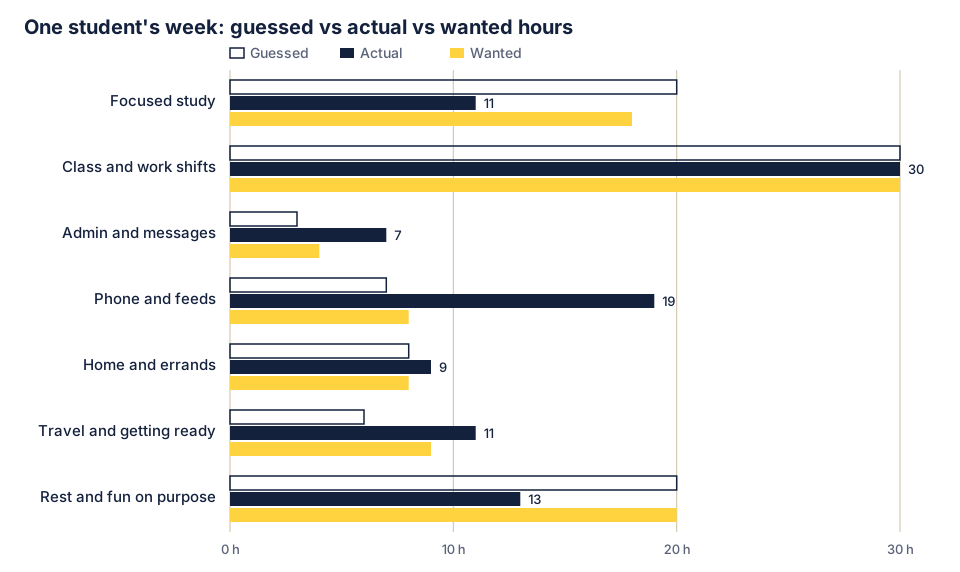
The fixed hours (class and shifts) were exactly as guessed. The surprises sat in the flexible time. “Study” blocks often turned into messages and feeds after 15 minutes, which is why focused study came in 9 hours under the guess and phone time 12 hours over. Getting ready and waiting between classes ate 5 more hours than expected.
The decisions: keep the two library afternoons, which were the only long study stretches all week. Cut the feeds that crept into study blocks by leaving the phone in a bag during them (our guide to making your phone boring has the 15-minute version). Move study from late evening, where most of it collapsed, into the gaps between classes. One change for next week: Tuesday and Thursday, 1pm to 2:30pm, study in the library with the phone in the bag.
Paper, spreadsheet or app?
Any of them works if you’ll open it every few hours.
Paper has no setup and stays visible on your desk, and our worksheet below is one day per page. A spreadsheet makes the totals easy, and our CSV is a week grid with a row per half hour. A time tracking app such as Toggl Track is quicker if you already live in one, but don’t spend your first audit learning a new tool. Your phone’s screen time report already measures app use, so use it to check the phone number instead of logging every pickup by hand.
A free time audit worksheet (PDF, spreadsheet and copyable)
We made a two-page printable: download the time audit worksheet (PDF). It’s free, and there’s no email form.
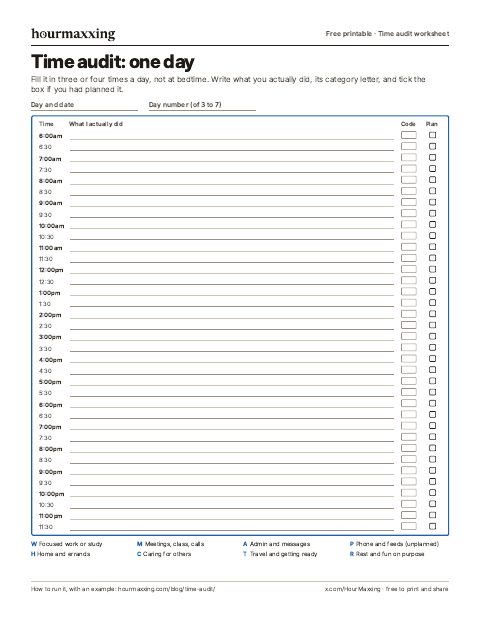
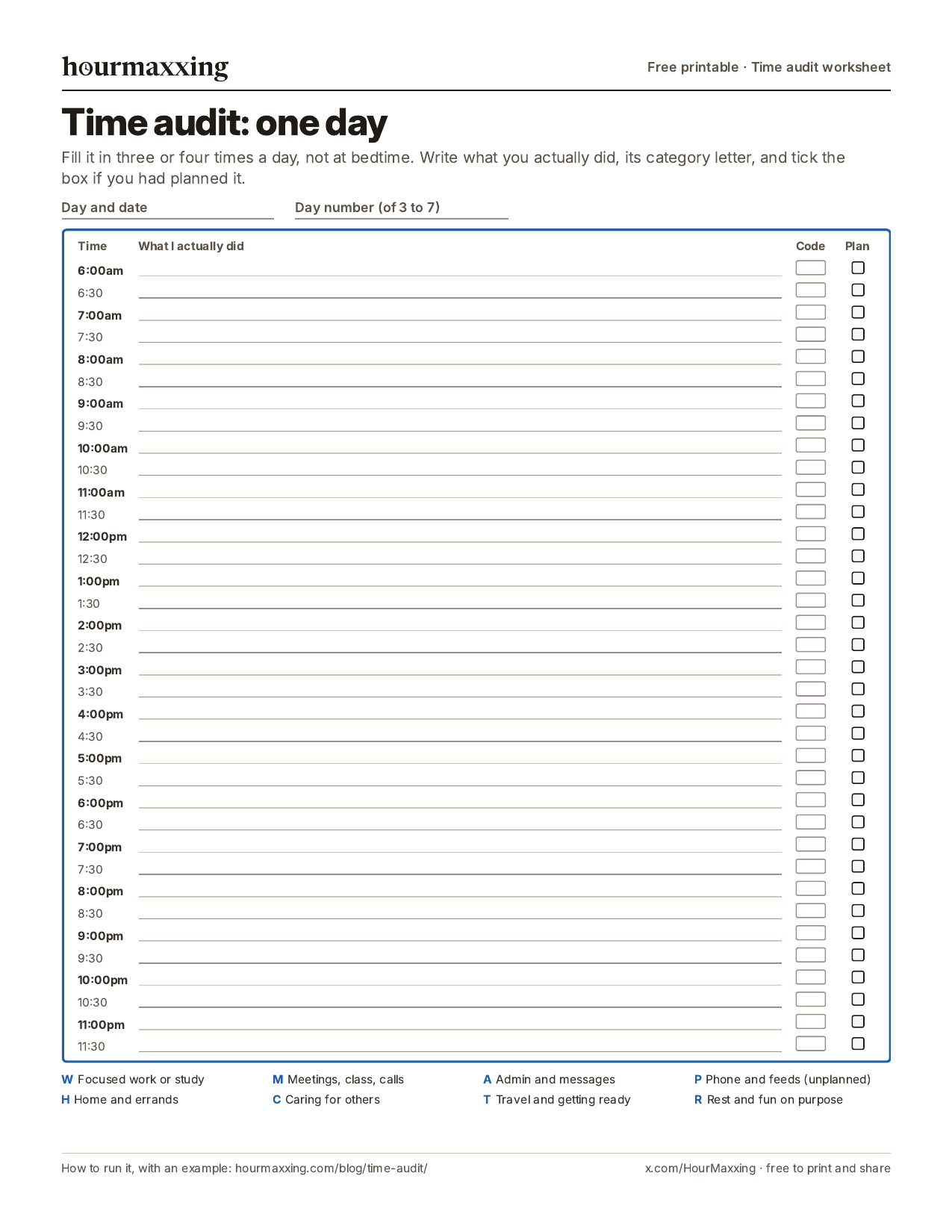
Page 1 is a one-day log. Thirty-six half-hour rows from 6am to midnight, each with a line for what you actually did, a box for the category code and a box to tick if it was planned. The category codes are printed at the bottom. Print one per day.
Page 2 is the review sheet. A table for guessed, actual and wanted hours per category (fill in the guesses before day 1), then the keep, cut and move questions and a line for next week’s one change.
There’s also a phone image of page 1. For Excel, Google Sheets or Notion, there’s a spreadsheet version (CSV): a week grid from 6am to midnight with a column per day, plus a summary table for guess, actual and want. In Google Sheets use File, then Import. If you’d rather keep it in a note, copy this:
- Before day 1: your guessed hours per week for each category.
- Each day, three or four times: what you did in each half hour, its category letter, planned or not.
- After the last day: count the half hours per category, divide by two, write actual next to guess.
- Want: the hours you’d like each category to get.
- Keep: one thing that earned its time.
- Cut or shrink: one leak.
- Move: one thing to a better time of day.
- Next week’s one change: what, which day, what time.
What to do with your time audit results
The totals are only useful if they turn into a decision. These questions help:
- Which number surprised you most? Start there. A big gap between guess and actual is a blind spot.
- When were your best hours, and what filled them? If your sharpest morning hours went to email, that’s the first thing to move. Our time blocking guide covers planning by energy.
- What happened right before the unplanned blocks? Often it’s the same trigger: opening the laptop with no first task, or picking up the phone “for a second”.
- What could you drop entirely? Drucker’s test was to ask, for each activity, what would happen if it weren’t done at all. If the answer is “nothing”, stop doing it.
- How long did your tasks really take? If “quick” jobs keep filling an hour, your estimates are running short. Our time blindness guide has a test for finding your personal multiplier, and the online time blindness test times your guesses against a hidden clock.
Then make one change, not ten. If phone time was the big surprise, the screen time calculator shows what it adds up to over a year. To turn the totals into a plan, draw an ideal week. A weekly review is a good place to check whether it held.
Does a time audit actually work? What the research says
Nobody has run a trial of the time audit as a method, as far as we could find. The evidence for its parts is better:
- Records beat memory. In US (American Time Use Survey) and Belgian time-diary data, people who estimated their own work hours overestimated them by 2.1 to 6.3 hours a week, or about 5 to 12 percent, with the biggest gaps among those reporting the longest weeks (Robinson, Martin, Glorieux and Minnen, 2011). Other researchers using the same survey found a smaller gap for some questions (Frazis and Stewart, 2014), so the size depends on how you ask. The direction for long workweeks is consistent.
- Diaries are the research standard. Large surveys of time use, like the American Time Use Survey, ask people to walk through yesterday in order, activity by activity, rather than estimate weekly totals. Kahneman and colleagues built their 2004 Day Reconstruction Method on the same idea: rebuild the previous day as a sequence of episodes.
- Past durations shape future guesses. A review by Roy, Christenfeld and McKenzie (2005) argued that one reason people underestimate how long tasks will take is that they remember past tasks as shorter than they were. A written record of actual times gives you better numbers to plan with.
- Monitoring helps you reach goals. A meta-analysis of 138 experiments found that prompting people to monitor their progress toward a goal improved goal attainment (d = 0.40, a small-to-medium effect), and the effect was larger when the progress was physically recorded or reported (Harkin and colleagues, 2016).
For a sense of scale, the 2025 American Time Use Survey found that people 15 and older spent an average of 5.2 hours a day on leisure and sports, half of it watching TV (BLS, 2026). Employed people averaged 4.2 hours of leisure a day. Your audit will tell you whether your own number looks like that.
Our take: a time audit works for the plain reason that it replaces a story with a record. The record does nothing by itself. The change you make afterward is the part that counts.
Time audits with ADHD (or when logging feels impossible)
Logging every half hour asks for exactly the kind of steady self-monitoring that ADHD makes hard. The audit still works with a few changes:
- Log one day, not seven. A single typical weekday tells you a lot. Do a weekend day another time.
- Use alarms, not memory. Set four phone alarms labelled “log”. When one goes off, fill in everything since the last one, rough is fine.
- Let the phone do part of it. Screen time reports and your calendar fill in a lot of blocks for you. Log only the gaps.
- Count gaps as data. A blank afternoon you can’t account for is a finding, not a failure. Write ”?” and move on.
- Look for the transitions. For many ADHD brains the hours vanish between tasks, not in them. Our task paralysis guide covers what to do when you’re stuck in that gap.
- Do it with someone. Log alongside a friend, or during a body doubling session, and compare totals at the end.
We are not clinicians, and nothing here is treatment advice.
Common time audit mistakes
- Skipping the guesses. Without them you can’t see what surprised you.
- Filling it in from memory at night. That’s the very error the audit exists to catch.
- Auditing an unusual week. A deadline week or a holiday week tells you about that week only.
- Too many categories. Twenty categories means you stop by Wednesday. Eight is plenty.
- Judging instead of recording. Write “phone, 45 min” and move on. Guilt makes people stop logging, or fudge it.
- Changing everything at once. Pick one change. If it holds for two weeks, pick the next.
- Never acting on it. A beautiful spreadsheet with no decision at the end is procrastination with extra steps.
Sources
- Drucker, P. F. (1967). The Effective Executive. Harper & Row. Chapter 2, “Know Thy Time”. Excerpt read at https://www.christianitytoday.com/pastors/content/knowthytime/ and https://www.mlaacademy.org/en/menu/post-know-thy-time-en/. Read: “do not start with their tasks. They start with their time”; recording, managing and consolidating time; the record made “at the time of the event itself, rather than later on from memory”; the chairman whose six-week record contradicted his guess; “record, rather than memory, has to be trusted”; logs for three to four weeks twice a year; drifting back within six months.
- Vanderkam, L. “168 Hours” time sheets (30-minute and 15-minute versions) and “Tracking time - care to join?” (2021). https://lauravanderkam.com/2021/01/tracking-time-care-to-join/. Read: weekly spreadsheets with 336 half-hour cells; check-ins a few times a day; writing more than one activity in a block; “being consistent is better than being thorough”.
- Robinson, J. P., Martin, S., Glorieux, I., & Minnen, J. (2011). The overestimated workweek revisited. Monthly Labor Review, 134(6), 43-53. https://www.bls.gov/opub/mlr/2011/article/overestimated-workweek-revisited.htm. Read: estimate minus diary gaps of 2.1 to 6.3 hours (5 to 12 percent); estimates averaged over 39 hours against about 36 in diaries; “greater estimate, greater overestimate”.
- Frazis, H., & Stewart, J. (2014). Is the workweek really overestimated? Monthly Labor Review. https://doi.org/10.21916/mlr.2014.21. Read: from an overestimate of 3.7 hours to an underestimate of 0.9 hours depending on the question; “no single answer”.
- Kahneman, D., Krueger, A. B., Schkade, D. A., Schwarz, N., & Stone, A. A. (2004). A survey method for characterizing daily life experience: The day reconstruction method. Science, 306(5702), 1776-1780. https://doi.org/10.1126/science.1103572.
- Roy, M. M., Christenfeld, N. J. S., & McKenzie, C. R. M. (2005). Underestimating the duration of future events: Memory incorrectly used or memory bias? Psychological Bulletin, 131(5), 738-756. https://doi.org/10.1037/0033-2909.131.5.738.
- Harkin, B., Webb, T. L., Chang, B. P. I., Prestwich, A., Conner, M., Kellar, I., Benn, Y., & Sheeran, P. (2016). Does monitoring goal progress promote goal attainment? A meta-analysis of the experimental evidence. Psychological Bulletin, 142(2), 198-229. https://doi.org/10.1037/bul0000025.
- U.S. Bureau of Labor Statistics (2026). American Time Use Survey, 2025 results. https://www.bls.gov/news.release/atus.htm. Read: leisure and sports 5.16 hours a day (age 15 and over), watching TV 2.61 hours; employed 4.17 hours (table 11A).
Want one more of these each week?
One technique a week, the study behind it, and a low-energy version. Free, about a 3-minute read, unsubscribe anytime.
We use your address only to send the email, and you can unsubscribe in one click.
FAQ
What is a time audit?
A time audit is a short record of how you actually spend your time, usually a few days to a week written down in 15 or 30 minute blocks, followed by a look at the totals. You compare where the hours went with where you thought they went and where you want them to go, then change one or two things. The idea goes back at least to Peter Drucker's 1967 book The Effective Executive, which told readers to record their time as they spend it, not from memory.
How do you do a time audit?
First write down your guess for how many hours a week go to each area of your life. Then log what you're doing in 30-minute blocks for three to seven days, filling it in a few times a day rather than once at night. Give each block a category, add up the hours, and put them next to your guesses. Finally pick one thing to keep, one to cut or shrink, and one to move to a better time, and try that single change for a week.
How long should a time audit last?
A full week is best, because weekdays and weekends usually look very different. Three typical weekdays is the minimum that tells you much. Peter Drucker suggested three to four weeks at a stretch, twice a year, for executives, which is more than most people need. If a week of logging sounds impossible, start with one day and do another later.
What categories should I use in a time audit?
Use six to nine broad categories so tagging a block takes a second. A set that works for most people: focused work or study, meetings and class, admin and messages, phone and feeds you didn't mean to open, home and errands, caring for others, travel and getting ready, and rest, meals and fun on purpose. Add a category only if you have a specific question about it, such as side project or job hunting.
What's the difference between a time audit and time tracking?
Time tracking is the ongoing habit of recording time, often for billing or for a single project. A time audit is a short, deliberate check: you log for a few days, review the totals once, make a change, and stop. Some people keep tracking all year, but most get what they need from an audit once or twice a year, or after a big change like a new job or semester.
Is there a free time audit worksheet?
Yes. We made a free two-page time audit worksheet PDF, no email needed: hourmaxxing.com/printables/time-audit-worksheet.pdf. Page 1 is a one-day log from 6am to midnight in 30-minute blocks, with a category code and a planned or unplanned box for each block. Page 2 compares your guessed, actual and wanted hours per category and ends with keep, cut and move questions. There's also a CSV week-grid version for Excel or Google Sheets.
What is the best time audit app?
The best tool is the one you will actually open every few hours. Paper or a phone note works fine and has no setup. Apps like Toggl Track or a spreadsheet are easier to total, and your phone's screen time report already measures app use, so you don't need to log that by hand. For a first audit, we'd pick paper or a spreadsheet over a new app, since learning the app can take longer than the audit.
Does a time audit actually work?
No trial has tested the time audit as a method, as far as we could find. Its parts have decent evidence. Records beat memory: in US and Belgian diary studies, people who estimated their own work hours overestimated them by about 5 to 12 percent, more so the longer they said they worked (Robinson and colleagues, 2011). And monitoring your progress toward a goal helps you reach it, with a stronger effect when the record is written down (Harkin and colleagues, 2016, 138 experiments). The audit only pays off if you change something afterward.
New here? Start with the reading order → Rather use paper? Grab a free printable.